1. Introduction
중급/고급. 제 개인적 프로젝트입니다. Syndia(Syntax Diagram)는 Syntax 분석 도우미 프로그램으로서 Andrew Radford의 Minimalist Syntax를 중심으로 구현합니다. 여기에는 핵심 아이디어 코드만 올려둡니다. 일단 제 자신을 위한 것이어서 친절한 코드 주석 따위는 없습니다. ^.^; 이 코드들은 시간이 날 때마다 부정기적으로 계속 업데이트될 예정입니다. Python을 다루는 실력이 달라질 때마다 코드는 조금씩 예고없이 바뀔 수도 있습니다. ^.^; 가능한 한 히스토리는 남겨두려고 합니다.
참고. 다음 코드들은 완성판 앱이 아니라 아직 아이디어 프로토타입 단계입니다. 그래도 저작권은 제작자인 저에게 있습니다. 무단 전재, 무단 복제 금지. 상업적 이용에는 서면 라이센스가 필요합니다. 비상업적 이용에는 비수정, 원저작자 및 출처 표기를 조건으로 합니다. (2026. 09. 15일)
^.^;
2. Code
2.1 기본 아이디어 프로토타입 A (v.0.0.1)
"""
기본 아이디어 프로토타입 A (v.0.0.1)
"""
import wx
class LinguisticsTree(wx.Panel):
def __init__(self, parent):
super().__init__(parent)
self.SetBackgroundStyle(wx.BG_STYLE_PAINT)
self.Bind(wx.EVT_PAINT, self.on_paint)
# 데이터 구조: (라벨, 자식 리스트, 삼각형 여부)
# 예: TP -> Spec(DP), T' -> T, VP(Triangle)
self.tree_data = (
"TP", [
("DP (Spec)", [("John", [], False)], False),
("T'", [
("T", [("will", [], False)], False),
("VP", [("read the book", [], True)], True) # 삼각형 표기
], False)
], False
)
def on_paint(self, event):
dc = wx.AutoBufferedPaintDC(self)
dc.Clear()
gc = wx.GraphicsContext.Create(dc)
if gc:
self.draw_node(gc, self.tree_data, self.GetSize().width // 2, 50, 150)
def draw_node(self, gc, node, x, y, x_offset):
label, children, is_triangle = node
# 1. 텍스트(라벨) 그리기
font = wx.Font(12, wx.FONTFAMILY_DEFAULT, wx.FONTSTYLE_NORMAL, wx.FONTWEIGHT_BOLD)
gc.SetFont(font, wx.BLACK)
w, h = gc.GetTextExtent(label)
gc.DrawText(label, x - w/2, y)
if not children:
return
# 자식 노드 좌표 계산
child_y = y + 70
left_x = x - x_offset
right_x = x + x_offset
gc.SetPen(wx.Pen(wx.BLACK, 2))
# 2. 선 또는 삼각형 그리기
if is_triangle:
# 삼각형 표기 (내부 구조 생략)
path = gc.CreatePath()
path.MoveToPoint(x, y + h + 5)
path.AddLineToPoint(x - 30, child_y)
path.AddLineToPoint(x + 30, child_y)
path.CloseSubpath()
gc.StrokePath(path)
else:
# 이분 가지 (Binary Branching)
for i, child in enumerate(children):
curr_child_x = left_x if i == 0 else right_x
gc.StrokeLine(x, y + h + 5, curr_child_x, child_y - 5)
# 재귀적으로 자식 노드 그리기
self.draw_node(gc, child, curr_child_x, child_y, x_offset // 1.8)
class MainFrame(wx.Frame):
def __init__(self):
super().__init__(None, title="Minimalist Syntax Tree Visualizer", size=(800, 600))
LinguisticsTree(self)
self.Show()
if __name__ == '__main__':
app = wx.App()
MainFrame()
app.MainLoop()
2.2 기본 아이디어 프로토타입 B (v.0.0.2)
"""
기본 아이디어 프로토타입 B, 업데이트 (v.0.0.2)
"""
import wx
import re
class LinguisticsTree(wx.Panel):
def __init__(self, parent):
super().__init__(parent)
self.SetBackgroundStyle(wx.BG_STYLE_PAINT)
self.Bind(wx.EVT_PAINT, self.on_paint)
# 데이터: [Label Text] 형태, t_i는 trace(이동 흔적)로 간주
self.input_string = "[TP [DP_i John] [T' [T will] [VP [V read] [DP t_i]]]]"
self.nodes_pos = {} # 이동 화살표를 위해 각 노드 좌표 저장
def parse_bracketing(self, text):
"""괄호 표기법을 재귀적 튜플 구조로 변환"""
text = text.strip()
if not text.startswith('['): return (text, [], False)
content = text[1:-1].strip()
match = re.match(r'^([^\s$$$$]+)', content)
label = match.group(1) if match else ""
rest = content[len(label):].strip()
children = []
bracket_level = 0
current_child = ""
for char in rest:
if char == '[': bracket_level += 1
elif char == ']': bracket_level -= 1
current_child += char
if bracket_level == 0 and current_child.strip():
children.append(self.parse_bracketing(current_child.strip()))
current_child = ""
# 라벨에 Triangle 표시가 있거나 자식이 없는데 띄어쓰기가 있으면 삼각형 처리
is_triangle = " " in label or "^" in label
return (label.replace("^", ""), children, is_triangle)
def on_paint(self, event):
dc = wx.AutoBufferedPaintDC(self)
dc.Clear()
gc = wx.GraphicsContext.Create(dc)
if not gc: return
self.nodes_pos = {}
tree_data = self.parse_bracketing(self.input_string)
self.draw_node(gc, tree_data, self.GetSize().width // 2, 50, 180)
self.draw_movement_arrows(gc)
def draw_node(self, gc, node, x, y, x_offset):
label, children, is_triangle = node
# 폰트 설정 (X' 등을 위해 가독성 좋은 폰트)
font = wx.Font(11, wx.FONTFAMILY_DEFAULT, wx.FONTSTYLE_NORMAL, wx.FONTWEIGHT_BOLD)
gc.SetFont(font, wx.BLACK)
w, h = gc.GetTextExtent(label)
gc.DrawText(label, x - w/2, y)
# 좌표 저장 (이동 화살표용)
self.nodes_pos[label] = (x, y + h)
if not children: return
child_y = y + 80
num_children = len(children)
for i, child in enumerate(children):
# 이분 가지 계산 (가운데 정렬)
curr_child_x = x + (i - (num_children-1)/2) * x_offset * 2
gc.SetPen(wx.Pen(wx.BLACK, 1))
if is_triangle:
path = gc.CreatePath()
path.MoveToPoint(x, y + h + 2)
path.AddLineToPoint(curr_child_x - 20, child_y)
path.AddLineToPoint(curr_child_x + 20, child_y)
path.CloseSubpath()
gc.StrokePath(path)
else:
gc.StrokeLine(x, y + h + 2, curr_child_x, child_y - 2)
self.draw_node(gc, child, curr_child_x, child_y, x_offset * 0.5)
def draw_movement_arrows(self, gc):
"""t_i와 DP_i 같은 인덱스를 찾아 곡선 화살표를 그림"""
indices = {}
for label, pos in self.nodes_pos.items():
if '_' in label:
idx = label.split('_')[1]
indices.setdefault(idx, []).append((label, pos))
gc.SetPen(wx.Pen(wx.RED, 1, wx.PENSTYLE_SHORT_DASH))
for idx, items in indices.items():
if len(items) >= 2:
# 관습적으로 뒤에 있는(하단) 것에서 앞에 있는(상단) 곳으로 화살표
start_pos = items[1][1] # t_i (Trace)
end_pos = items[0][1] # DP_i (Landing site)
path = gc.CreatePath()
path.MoveToPoint(start_pos[0], start_pos[1] + 5)
# 하단으로 휘어지는 곡선 생성
ctrl_x = (start_pos[0] + end_pos[0]) / 2
ctrl_y = max(start_pos[1], end_pos[1]) + 50
path.AddQuadCurveToPoint(ctrl_x, ctrl_y, end_pos[0], end_pos[1] + 5)
gc.StrokePath(path)
class MainFrame(wx.Frame):
def __init__(self):
super().__init__(None, title="Minimalist Syntax Parser", size=(900, 700))
panel = wx.Panel(self)
vbox = wx.BoxSizer(wx.VERTICAL)
self.tree_view = LinguisticsTree(panel)
self.input_ctrl = wx.TextCtrl(panel, value=self.tree_view.input_string)
btn = wx.Button(panel, label="트리 그리기")
btn.Bind(wx.EVT_BUTTON, self.on_refresh)
vbox.Add(self.tree_view, 1, wx.EXPAND | wx.ALL, 5)
vbox.Add(self.input_ctrl, 0, wx.EXPAND | wx.ALL, 10)
vbox.Add(btn, 0, wx.ALIGN_CENTER | wx.BOTTOM, 10)
panel.SetSizer(vbox)
self.Show()
def on_refresh(self, event):
self.tree_view.input_string = self.input_ctrl.GetValue()
self.tree_view.Refresh()
if __name__ == '__main__':
app = wx.App()
MainFrame()
app.MainLoop()
"""
다이어그램 표시에 약간 문제가 있어서 다른 방식으로 재작성 업데이트 예정.
하지만 아이디어는 가능한 한 그대로 둘 것.
"""
2.3 기본 아이디어 프로토타입 C, 업데이트 (v.0.0.3)
"""
기본 아이디어 프로토타입 C, 업데이트 (v.0.0.3)
Notes :
To do List - 하단 Notes 섹션에.
"""
import wx
import json
import os
from dataclasses import dataclass, field
from typing import List, Optional, Tuple
# ============================================================
# 1. 통사 구조 노드
# ============================================================
@dataclass
class SyntaxNode:
label: str
children: List["SyntaxNode"] = field(default_factory=list)
is_triangle: bool = False
# 화면상 위치
x: float = 0
y: float = 0
# 고유 ID
node_id: int = 0
# 부모 노드
parent: Optional["SyntaxNode"] = field(
default=None,
repr=False,
compare=False
)
def add_child(self, child):
child.parent = self
self.children.append(child)
def to_dict(self):
return {
"label": self.label,
"children": [
child.to_dict()
for child in self.children
],
"is_triangle": self.is_triangle,
"x": self.x,
"y": self.y,
"node_id": self.node_id
}
@classmethod
def from_dict(cls, data, parent=None):
node = cls(
label=data.get("label", ""),
is_triangle=data.get("is_triangle", False),
x=data.get("x", 0),
y=data.get("y", 0),
node_id=data.get("node_id", 0),
parent=parent
)
for child_data in data.get("children", []):
child = cls.from_dict(child_data, node)
node.children.append(child)
return node
# ============================================================
# 2. 통사 트리 데이터
# ============================================================
def create_default_tree():
"""
프로토타입 구조를 유지한 기본 트리.
TP
├── DP (Spec)
│ └── John
└── T'
├── T
│ └── will
└── VP △
└── read the book
"""
root = SyntaxNode("TP")
spec = SyntaxNode("DP (Spec)")
spec.add_child(SyntaxNode("John"))
t_bar = SyntaxNode("T'")
t_node = SyntaxNode("T")
t_node.add_child(SyntaxNode("will"))
vp = SyntaxNode("VP", is_triangle=True)
vp.add_child(SyntaxNode("read the book"))
t_bar.add_child(t_node)
t_bar.add_child(vp)
root.add_child(spec)
root.add_child(t_bar)
return root
# ============================================================
# 3. 간단한 문장 -> 통사 트리 생성기
# ============================================================
class SimpleSyntaxParser:
@staticmethod
def parse(sentence):
"""
간단한 영어 문장에 대한 기본 X-bar 스타일 트리.
예:
John will read the book.
The boy likes Mary.
John reads books.
실제 자연언어 통사 분석기가 아니라
Syndia 프로토타입용 기본 구조 생성기입니다.
"""
words = sentence.strip().split()
if not words:
return create_default_tree()
words = [
word.strip(".,!?")
for word in words
]
# 조동사 목록
auxiliaries = {
"will", "can", "could", "may",
"might", "must", "should",
"would", "shall"
}
# 기본 TP
root = SyntaxNode("TP")
# 주어
subject = words[0]
spec = SyntaxNode("DP (Spec)")
spec.add_child(SyntaxNode(subject))
root.add_child(spec)
# 조동사가 있는 경우
if len(words) >= 2 and words[1].lower() in auxiliaries:
auxiliary = words[1]
t_bar = SyntaxNode("T'")
t_node = SyntaxNode("T")
t_node.add_child(SyntaxNode(auxiliary))
vp = SyntaxNode("VP")
if len(words) > 2:
vp.add_child(
SyntaxNode(" ".join(words[2:]))
)
t_bar.add_child(t_node)
t_bar.add_child(vp)
root.add_child(t_bar)
else:
# 조동사가 없는 일반 문장
t_bar = SyntaxNode("T'")
t_node = SyntaxNode("T")
t_node.add_child(SyntaxNode("∅"))
vp = SyntaxNode("VP")
if len(words) > 1:
vp.add_child(
SyntaxNode(" ".join(words[1:]))
)
t_bar.add_child(t_node)
t_bar.add_child(vp)
root.add_child(t_bar)
return root
# ============================================================
# 4. 통사 트리 패널
# ============================================================
class LinguisticsTree(wx.Panel):
def __init__(self, parent):
super().__init__(parent)
self.SetBackgroundStyle(wx.BG_STYLE_PAINT)
self.Bind(wx.EVT_PAINT, self.on_paint)
self.Bind(wx.EVT_LEFT_DOWN, self.on_left_down)
self.Bind(wx.EVT_LEFT_UP, self.on_left_up)
self.Bind(wx.EVT_MOTION, self.on_motion)
self.Bind(wx.EVT_LEFT_DCLICK, self.on_double_click)
self.Bind(wx.EVT_RIGHT_DOWN, self.on_right_down)
self.Bind(wx.EVT_SIZE, self.on_size)
# 기존 데이터 구조를 확장한 트리
self.tree_data = create_default_tree()
# 선택된 노드
self.selected_node = None
# 드래그 상태
self.dragging_node = None
self.drag_start_pos = None
self.drag_start_node_pos = None
# 편집 모드
self.edit_mode = False
# 노드 ID 부여
self.assign_node_ids()
# 자동 레이아웃 사용 여부
self.auto_layout = True
# 화면 확대/축소
self.zoom = 1.0
# 기본 설정
self.node_gap_x = 90
self.node_gap_y = 85
self.SetMinSize((600, 400))
# --------------------------------------------------------
# 노드 ID
# --------------------------------------------------------
def assign_node_ids(self):
counter = [0]
def walk(node):
node.node_id = counter[0]
counter[0] += 1
for child in node.children:
child.parent = node
walk(child)
walk(self.tree_data)
# --------------------------------------------------------
# 레이아웃 계산
# --------------------------------------------------------
def calculate_layout(self):
if not self.auto_layout:
return
width, height = self.GetSize()
# 전체 트리의 폭 계산
next_x = [0]
def measure(node):
if not node.children:
return 1
return sum(measure(child) for child in node.children)
total_width = measure(self.tree_data)
# 노드 간 기본 간격
spacing = max(
100,
min(180, width / max(total_width, 1))
)
def layout(node, depth, left):
subtree_width = measure(node)
if not node.children:
node.x = left + spacing / 2
node.y = 50 + depth * self.node_gap_y
return left + spacing
current_left = left
for child in node.children:
current_left = layout(
child,
depth + 1,
current_left
)
first_child = node.children[0]
last_child = node.children[-1]
node.x = (
first_child.x + last_child.x
) / 2
node.y = 50 + depth * self.node_gap_y
return left + subtree_width * spacing
layout(
self.tree_data,
0,
max(20, (width - total_width * spacing) / 2)
)
# --------------------------------------------------------
# Paint
# --------------------------------------------------------
def on_paint(self, event):
dc = wx.AutoBufferedPaintDC(self)
dc.Clear()
gc = wx.GraphicsContext.Create(dc)
if gc:
self.calculate_layout()
gc.SetAntialiasMode(wx.ANTIALIAS_DEFAULT)
self.draw_node(
gc,
self.tree_data
)
# --------------------------------------------------------
# 노드 그리기
# --------------------------------------------------------
def draw_node(self, gc, node):
x = node.x * self.zoom
y = node.y * self.zoom
# 선택된 노드 강조
is_selected = (
node == self.selected_node
)
font = wx.Font(
12,
wx.FONTFAMILY_DEFAULT,
wx.FONTSTYLE_NORMAL,
wx.FONTWEIGHT_BOLD
)
gc.SetFont(font, wx.BLACK)
w, h = gc.GetTextExtent(node.label)
text_x = x - w / 2
text_y = y
# 선택 노드 배경
if is_selected:
gc.SetBrush(
wx.Brush(wx.Colour(220, 235, 255))
)
gc.SetPen(
wx.Pen(wx.Colour(40, 100, 200), 2)
)
gc.DrawRectangle(
text_x - 8,
text_y - 5,
w + 16,
h + 10
)
# 라벨
gc.DrawText(
node.label,
text_x,
text_y
)
# 자식이 없으면 종료
if not node.children:
return
child_y = (y + 70) * self.zoom
gc.SetPen(wx.Pen(wx.BLACK, 2))
# 삼각형 구조
if node.is_triangle:
path = gc.CreatePath()
path.MoveToPoint(
x,
(y + h + 5) * self.zoom
)
path.AddLineToPoint(
x - 30 * self.zoom,
child_y
)
path.AddLineToPoint(
x + 30 * self.zoom,
child_y
)
path.CloseSubpath()
gc.StrokePath(path)
else:
# 일반 가지
for child in node.children:
child_x = child.x * self.zoom
gc.StrokeLine(
x,
(y + h + 5) * self.zoom,
child_x,
child_y - 5
)
self.draw_node(gc, child)
# --------------------------------------------------------
# 모든 노드 검색
# --------------------------------------------------------
def all_nodes(self):
result = []
def walk(node):
result.append(node)
for child in node.children:
walk(child)
walk(self.tree_data)
return result
# --------------------------------------------------------
# 노드 위치 찾기
# --------------------------------------------------------
def find_node_at(self, x, y):
for node in reversed(self.all_nodes()):
nx = node.x * self.zoom
ny = node.y * self.zoom
# 간단한 hit box
if (
abs(x - nx) < 80
and abs(y - ny) < 30
):
return node
return None
# --------------------------------------------------------
# 마우스 클릭
# --------------------------------------------------------
def on_left_down(self, event):
pos = event.GetPosition()
node = self.find_node_at(
pos.x,
pos.y
)
if node:
self.selected_node = node
self.dragging_node = node
self.drag_start_pos = pos
self.drag_start_node_pos = (
node.x,
node.y
)
self.Refresh()
event.Skip()
def on_left_up(self, event):
self.dragging_node = None
self.drag_start_pos = None
self.drag_start_node_pos = None
event.Skip()
# --------------------------------------------------------
# 노드 이동
# --------------------------------------------------------
def on_motion(self, event):
if (
self.dragging_node
and event.Dragging()
and event.LeftIsDown()
):
pos = event.GetPosition()
dx = pos.x - self.drag_start_pos.x
dy = pos.y - self.drag_start_pos.y
self.dragging_node.x = (
self.drag_start_node_pos[0]
+ dx / self.zoom
)
self.dragging_node.y = (
self.drag_start_node_pos[1]
+ dy / self.zoom
)
self.auto_layout = False
self.Refresh()
event.Skip()
# --------------------------------------------------------
# 더블클릭: 라벨 편집
# --------------------------------------------------------
def on_double_click(self, event):
pos = event.GetPosition()
node = self.find_node_at(
pos.x,
pos.y
)
if not node:
return
dlg = wx.TextEntryDialog(
self,
"새 노드 라벨을 입력하세요:",
"노드 편집",
node.label
)
if dlg.ShowModal() == wx.ID_OK:
new_label = dlg.GetValue().strip()
if new_label:
node.label = new_label
self.Refresh()
dlg.Destroy()
# --------------------------------------------------------
# 우클릭: 노드 메뉴
# --------------------------------------------------------
def on_right_down(self, event):
pos = event.GetPosition()
node = self.find_node_at(
pos.x,
pos.y
)
if not node:
return
self.selected_node = node
menu = wx.Menu()
edit_item = menu.Append(
wx.ID_ANY,
"라벨 편집"
)
add_item = menu.Append(
wx.ID_ANY,
"자식 노드 추가"
)
triangle_item = menu.Append(
wx.ID_ANY,
"삼각형 전환"
)
delete_item = menu.Append(
wx.ID_ANY,
"노드 삭제"
)
self.Bind(
wx.EVT_MENU,
lambda e: self.edit_node(node),
edit_item
)
self.Bind(
wx.EVT_MENU,
lambda e: self.add_child_node(node),
add_item
)
self.Bind(
wx.EVT_MENU,
lambda e: self.toggle_triangle(node),
triangle_item
)
self.Bind(
wx.EVT_MENU,
lambda e: self.delete_node(node),
delete_item
)
self.PopupMenu(menu)
menu.Destroy()
# --------------------------------------------------------
# 노드 편집
# --------------------------------------------------------
def edit_node(self, node):
dlg = wx.TextEntryDialog(
self,
"새 라벨:",
"노드 편집",
node.label
)
if dlg.ShowModal() == wx.ID_OK:
value = dlg.GetValue().strip()
if value:
node.label = value
self.Refresh()
dlg.Destroy()
# --------------------------------------------------------
# 자식 추가
# --------------------------------------------------------
def add_child_node(self, node):
dlg = wx.TextEntryDialog(
self,
"새 자식 노드의 라벨:",
"자식 노드 추가",
"New Node"
)
if dlg.ShowModal() == wx.ID_OK:
value = dlg.GetValue().strip()
if value:
child = SyntaxNode(value)
node.add_child(child)
self.assign_node_ids()
self.auto_layout = True
self.Refresh()
dlg.Destroy()
# --------------------------------------------------------
# 삼각형 전환
# --------------------------------------------------------
def toggle_triangle(self, node):
node.is_triangle = not node.is_triangle
self.Refresh()
# --------------------------------------------------------
# 노드 삭제
# --------------------------------------------------------
def delete_node(self, node):
if node == self.tree_data:
wx.MessageBox(
"루트 노드는 삭제할 수 없습니다.",
"알림"
)
return
parent = node.parent
if parent:
parent.children.remove(node)
self.selected_node = None
self.assign_node_ids()
self.auto_layout = True
self.Refresh()
# --------------------------------------------------------
# 트리 교체
# --------------------------------------------------------
def set_tree(self, root):
self.tree_data = root
self.selected_node = None
self.dragging_node = None
self.assign_node_ids()
self.auto_layout = True
self.Refresh()
# --------------------------------------------------------
# 확대 / 축소
# --------------------------------------------------------
def zoom_in(self):
self.zoom = min(
self.zoom + 0.1,
2.0
)
self.Refresh()
def zoom_out(self):
self.zoom = max(
self.zoom - 0.1,
0.5
)
self.Refresh()
def reset_view(self):
self.zoom = 1.0
self.auto_layout = True
self.Refresh()
# --------------------------------------------------------
# 창 크기 변경
# --------------------------------------------------------
def on_size(self, event):
if self.auto_layout:
self.Refresh()
event.Skip()
# ============================================================
# 5. 메인 프레임
# ============================================================
# 메인 프레임 수정판
class MainFrame(wx.Frame):
def __init__(self):
super().__init__(
None,
title="Syndia - Minimalist Syntax Tree Visualizer",
size=(1000, 750)
)
# UI 생성
self.create_ui()
self.Centre()
self.Show()
# --------------------------------------------------------
# UI 구성
# --------------------------------------------------------
def create_ui(self):
# 메인 패널
main_panel = wx.Panel(self)
main_sizer = wx.BoxSizer(wx.VERTICAL)
# 중요:
# tree_panel의 부모를 MainFrame이 아니라
# main_panel으로 지정해야 합니다.
self.tree_panel = LinguisticsTree(main_panel)
# ----------------------------------------------------
# 상단 툴바
# ----------------------------------------------------
toolbar = wx.Panel(main_panel)
toolbar_sizer = wx.BoxSizer(wx.HORIZONTAL)
# 문장 입력
toolbar_sizer.Add(
wx.StaticText(
toolbar,
label="Sentence:"
),
0,
wx.ALIGN_CENTER_VERTICAL | wx.ALL,
5
)
self.sentence_input = wx.TextCtrl(
toolbar,
value="John will read the book",
size=(300, -1)
)
toolbar_sizer.Add(
self.sentence_input,
0,
wx.ALL,
5
)
# 문장 -> 트리 생성
generate_button = wx.Button(
toolbar,
label="Generate Tree"
)
generate_button.Bind(
wx.EVT_BUTTON,
self.on_generate_tree
)
toolbar_sizer.Add(
generate_button,
0,
wx.ALL,
5
)
# 기본 트리
default_button = wx.Button(
toolbar,
label="Default Tree"
)
default_button.Bind(
wx.EVT_BUTTON,
self.on_default_tree
)
toolbar_sizer.Add(
default_button,
0,
wx.ALL,
5
)
toolbar.SetSizer(toolbar_sizer)
main_sizer.Add(
toolbar,
0,
wx.EXPAND
)
# ----------------------------------------------------
# 두 번째 툴바
# ----------------------------------------------------
toolbar2 = wx.Panel(main_panel)
toolbar2_sizer = wx.BoxSizer(wx.HORIZONTAL)
# 저장
save_button = wx.Button(
toolbar2,
label="Save JSON"
)
save_button.Bind(
wx.EVT_BUTTON,
self.on_save
)
toolbar2_sizer.Add(
save_button,
0,
wx.ALL,
5
)
# 불러오기
load_button = wx.Button(
toolbar2,
label="Load JSON"
)
load_button.Bind(
wx.EVT_BUTTON,
self.on_load
)
toolbar2_sizer.Add(
load_button,
0,
wx.ALL,
5
)
# 확대
zoom_in_button = wx.Button(
toolbar2,
label="Zoom +"
)
zoom_in_button.Bind(
wx.EVT_BUTTON,
lambda event: self.tree_panel.zoom_in()
)
toolbar2_sizer.Add(
zoom_in_button,
0,
wx.ALL,
5
)
# 축소
zoom_out_button = wx.Button(
toolbar2,
label="Zoom -"
)
zoom_out_button.Bind(
wx.EVT_BUTTON,
lambda event: self.tree_panel.zoom_out()
)
toolbar2_sizer.Add(
zoom_out_button,
0,
wx.ALL,
5
)
# 리셋
reset_button = wx.Button(
toolbar2,
label="Reset View"
)
reset_button.Bind(
wx.EVT_BUTTON,
lambda event: self.tree_panel.reset_view()
)
toolbar2_sizer.Add(
reset_button,
0,
wx.ALL,
5
)
toolbar2.SetSizer(toolbar2_sizer)
main_sizer.Add(
toolbar2,
0,
wx.EXPAND
)
# ----------------------------------------------------
# 트리 패널
# ----------------------------------------------------
main_sizer.Add(
self.tree_panel,
1,
wx.EXPAND | wx.ALL,
5
)
# ----------------------------------------------------
# 하단 안내
# ----------------------------------------------------
self.status_text = wx.StaticText(
main_panel,
label=(
"마우스 왼쪽 클릭: 노드 선택 / 이동 "
"더블클릭: 라벨 편집 "
"우클릭: 노드 메뉴"
)
)
main_sizer.Add(
self.status_text,
0,
wx.ALL,
8
)
# 메인 패널에 Sizer 연결
main_panel.SetSizer(main_sizer)
# --------------------------------------------------------
# 문장 생성
# --------------------------------------------------------
def on_generate_tree(self, event):
sentence = self.sentence_input.GetValue()
root = SimpleSyntaxParser.parse(sentence)
self.tree_panel.set_tree(root)
# --------------------------------------------------------
# 기본 트리
# --------------------------------------------------------
def on_default_tree(self, event):
self.sentence_input.SetValue(
"John will read the book"
)
self.tree_panel.set_tree(
create_default_tree()
)
# --------------------------------------------------------
# JSON 저장
# --------------------------------------------------------
def on_save(self, event):
with wx.FileDialog(
self,
"트리 저장",
wildcard="JSON files (*.json)|*.json",
style=wx.FD_SAVE | wx.FD_OVERWRITE_PROMPT
) as dlg:
if dlg.ShowModal() == wx.ID_CANCEL:
return
path = dlg.GetPath()
try:
data = self.tree_panel.tree_data.to_dict()
with open(
path,
"w",
encoding="utf-8"
) as f:
json.dump(
data,
f,
ensure_ascii=False,
indent=4
)
wx.MessageBox(
"트리를 저장했습니다.",
"저장 완료"
)
except Exception as e:
wx.MessageBox(
f"저장 중 오류가 발생했습니다:\n{e}",
"오류"
)
# --------------------------------------------------------
# JSON 불러오기
# --------------------------------------------------------
def on_load(self, event):
with wx.FileDialog(
self,
"트리 불러오기",
wildcard="JSON files (*.json)|*.json",
style=wx.FD_OPEN | wx.FD_FILE_MUST_EXIST
) as dlg:
if dlg.ShowModal() == wx.ID_CANCEL:
return
path = dlg.GetPath()
try:
with open(
path,
"r",
encoding="utf-8"
) as f:
data = json.load(f)
root = SyntaxNode.from_dict(data)
self.tree_panel.set_tree(root)
wx.MessageBox(
"트리를 불러왔습니다.",
"불러오기 완료"
)
except Exception as e:
wx.MessageBox(
f"불러오기 중 오류가 발생했습니다:\n{e}",
"오류"
)
# ============================================================
# 6. 프로그램 실행
# ============================================================
if __name__ == "__main__":
app = wx.App(False)
frame = MainFrame()
app.MainLoop()
3. Result
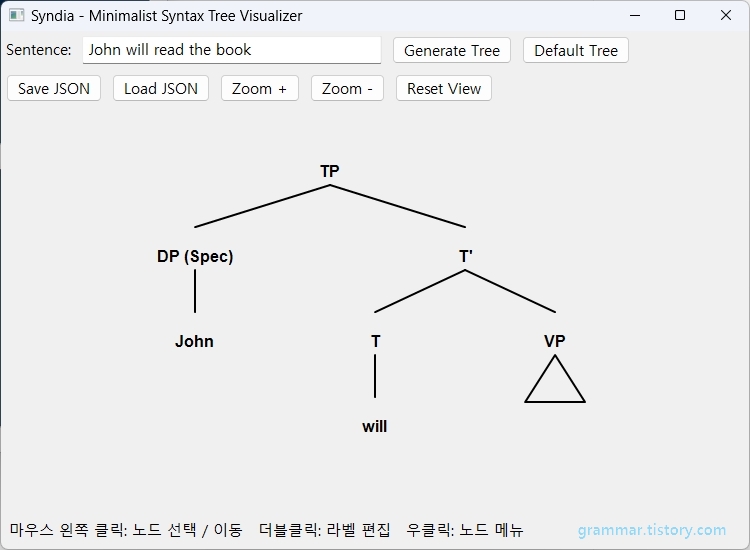
일단 대략은 다음과 같이 생겼습니다.
...
...
4. Notes
To Do List :
- UI 및 기본 작동 관련
1) 아직 줌 기능은 미완, 생각중. ^.^;;
2) 메뉴, 상태바 정리 필요.
3) 저장, 인쇄, 내보내기(Syntax 트리 분석과, 다이어그램 분리해서 생각할 필요)
4) 툴바.
5) 아이콘들.
6) About 윈도우.
7) Self 프로젝션 개선.
- 앱 구조 관련
8) 제한적 DB( MySQL, MariaDB, SQLite. 선택 가능하면 좋을 듯)
9) Mobile 앱. 웹 앱.
- 주요 기능 및 알고리즘 관련.
10) 정확한 트리 레이아웃 엔진 — 노드 이동과 자동 정렬을 함께 지원
11) 트리 내보내기 — PNG / SVG / PDF
12) 통사 구조 편집기 — Merge, Split, Move, Delete
- NLP 관련.
13) X-bar 이론 규칙 — Specifier, Head, Complement, Adjunct
14) 문장 분석 엔진 — 단순 문자열이 아닌 품사·구문 구조 분석
15) 자연어 통사 분석기
16) 자연어 통사 분석을 위한 주요 Ai NLP API 통합
...
...
5. Files
...
...
6. Ref.
...
...
아름다운 세상
즐거운 기초수학
즐거운 프로그래밍.
^.^;
'Programming > Python' 카테고리의 다른 글
| wx.Sizer() (0) | 2026.09.20 |
|---|---|
| wxPython 기본 위젯 - 003 - Panel, Sizer, Menu, Status Bar (0) | 2026.09.07 |
| wxPython 기본 위젯 - 002 - Panel Container Widget (0) | 2026.09.06 |
| Python Class - 001 (0) | 2026.08.30 |
| wxPython 기본 위젯들 - 1 (0) | 2026.08.09 |


